Beiträge von Mitleser
-
-
Letzte beiden sind im Übrigen die gleichen Symbole, aber unteres ist das "originale", schwarz und leider nicht per CSS-Code einfärbbar
So gehts:
XML<svg enable-background="new 0 0 512 512" viewBox="0 0 512 512" xmlns="http://www.w3.org/2000/svg"> <path style="stroke:none;fill-rule:nonzero;fill:context-fill;fill-opacity:context-fill-opacity;" d="M96 128a128 128 0 1 1 256 0A128 128 0 1 1 96 128zM0 482.3C0 383.8 79.8 304 178.3 304h91.4C368.2 304 448 383.8 448 482.3c0 16.4-13.3 29.7-29.7 29.7H29.7C13.3 512 0 498.7 0 482.3zM609.3 512H471.4c5.4-9.4 8.6-20.3 8.6-32v-8c0-60.7-27.1-115.2-69.8-151.8c2.4-.1 4.7-.2 7.1-.2h61.4C567.8 320 640 392.2 640 481.3c0 17-13.8 30.7-30.7 30.7zM432 256c-31 0-59-12.6-79.3-32.9C372.4 196.5 384 163.6 384 128c0-26.8-6.6-52.1-18.3-74.3C384.3 40.1 407.2 32 432 32c61.9 0 112 50.1 112 112s-50.1 112-112 112z"/></svg> -
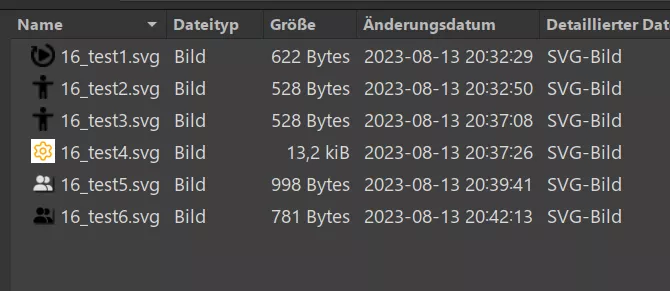
Mit Win kann ich nicht dienen, aber hier die Vorschau auf Lin mit Nemo:
-
In den .svg's ändere ich:
fill:context-fill;fill-opacity:context-fill-opacity;
Und im .css 'färbe' ich sie mit:
fill: orange !important;
fill-opacity: 1 !important;
ein.
-
Danke, habe ich geändert.
-
Die Icons habe ich quasi im Vorbeigehen eingesammelt.
Aber eine umfangreiche freie Quelle für .svg's ist:
Material Design Icons - Icon Library - PictogrammersThe original. Following Google's Material Design guidelines for system icons, MDI is our largest library, touting over 7200 unique icons!pictogrammers.com(nicht von 'Material Design Icons' täuschen lassen...)
-
Ja. Und tooltip[label] sollte die richtige Syntax sein. Funktioniert hier bloß nicht. Hier ein Screenshot mit einem Text ohne Leerzeichen:
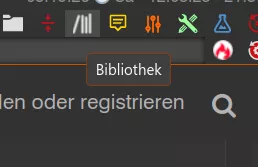
Das geht:
CSS
Alles anzeigentooltip[label*=" "] { appearance: none !important; background-color: #3f3f3f !important; color: #F9F9F9 !important; font-size: 12px !important; line-height: unset !important; border: 1px solid #b03b0099 !important; border-radius: 4px !important; box-shadow: none !important; width: auto !important; height: auto !important; justify-content: center !important; align-items: center !important; align-content: center !important; vertical-align: middle !important; overflow: hidden !important; padding: 3px 7px 5px 7px !important; }Das nicht:
CSS
Alles anzeigentooltip[label] { appearance: none !important; background-color: #3f3f3f !important; color: #F9F9F9 !important; font-size: 12px !important; line-height: unset !important; border: 1px solid #b03b0099 !important; border-radius: 4px !important; box-shadow: none !important; width: auto !important; height: auto !important; justify-content: center !important; align-items: center !important; align-content: center !important; vertical-align: middle !important; overflow: hidden !important; padding: 3px 7px 5px 7px !important; }Finde den Fehler.
-
Scheint irgendwie Betriebssystemabhängig zu sein. Bin auf LIN. Bei tooltip[label] wird nichts angesprochen, es muss schon tooltip[label*=" "] sein. tooltip habe ich schlicht vergessen.
Dieses Prob kann ich hier nicht nachvollziehen:
Das Überhangsmenü und Erweiterungsmenü scheint beim ersten Öffnen aber immer noch etwas Probleme zu machen, schliessen sich bei Hover.
Das kann ich hier nicht feststellen. Egal wie ich das css in js einbette ('Methode Endor' oder wie ich es gemacht habe ). Das macht hier keinen Unterschied und bereitet keine Probleme.
-
Hier die Icons, einfach umbenennen (wenn nötig)...auf .svg
-
Hier mal meine Lösung (mit Links/Mittel-Klick-Button):
JavaScript
Alles anzeigen/*1. Verhalten des Tooltips beim start*/ (function ttstart() { // start config area-------------------------------------------- let IconPath = PathUtils.toFileURI(PathUtils.join(PathUtils.profileDir, 'chrome', 'css', 'image')); // Pfad zum Ordner der das .svg-Symbol (mit: fill="context-fill" fill-opacity="context-fill-opacity") beinhaltet. // end config area---------------------------------------------- g1_tooltip_b = "0"; let sss = Components.classes["@mozilla.org/content/style-sheet-service;1"].getService(Components.interfaces.nsIStyleSheetService); let uri = Services.io.newURI("data:text/css;charset=utf-8," + encodeURIComponent(` tooltip[label*=" "], tooltip, #tabbrowser-tab-tooltip { appearance: none !important; background-color: #3f3f3f !important; color: #F9F9F9 !important; font-size: 12px !important; line-height: unset !important; border: 1px solid #b03b0099 !important; border-radius: 4px !important; box-shadow: none !important; width: auto !important; height: auto !important; justify-content: center !important; align-items: center !important; align-content: center !important; vertical-align: middle !important; overflow: hidden !important; padding: 3px 7px 5px 7px !important; display: none !important; } .places-tooltip { display: flex !important; } #remoteBrowserTooltip{ display: none !important; } #toggle-tt-button .toolbarbutton-icon { list-style-image: url("${IconPath}/16_tooltip-empty_contprop.svg") !important; fill: #cc5200 !important; transition: fill 0.4s ease-in-out 0.0s !important; } #toggle-tt-button:hover .toolbarbutton-icon { list-style-image: url("${IconPath}/16_tooltip-empty_contprop.svg") !important; fill: #dddddd !important; transition: fill 0.4s ease-in-out 0.0s !important; } #toggle-tt-button:active .toolbarbutton-icon { list-style-image: url("${IconPath}/16_tooltip-text_contprop.svg") !important; fill: gold !important; transition: fill 0.0s ease-in-out 0.0s !important; } `), null, null); sss.loadAndRegisterSheet(uri, sss.AGENT_SHEET); })(); /*2. Einschalten des Tooltips per Button*/ function tton() { // start config area-------------------------------------------- let IconPath = PathUtils.toFileURI(PathUtils.join(PathUtils.profileDir, 'chrome', 'css', 'image')); // Pfad zum Ordner der das .svg-Symbol (mit: fill="context-fill" fill-opacity="context-fill-opacity") beinhaltet. // end config area---------------------------------------------- g1_tooltip_b = "1"; let sss = Components.classes["@mozilla.org/content/style-sheet-service;1"].getService(Components.interfaces.nsIStyleSheetService); let uri = Services.io.newURI("data:text/css;charset=utf-8," + encodeURIComponent(` tooltip[label*=" "], tooltip, #tabbrowser-tab-tooltip { display: flex !important; } .places-tooltip { display: flex !important; } #remoteBrowserTooltip{ display: none !important; } #toggle-tt-button .toolbarbutton-icon { list-style-image: url("${IconPath}/16_tooltip-text_contprop.svg") !important; fill: gold !important; transition: fill 0.4s ease-in-out 0.0s !important; } #toggle-tt-button:hover .toolbarbutton-icon { list-style-image: url("${IconPath}/16_tooltip-text_contprop.svg") !important; fill: #dddddd !important; transition: fill 0.4s ease-in-out 0.0s !important; } #toggle-tt-button:active .toolbarbutton-icon { list-style-image: url("${IconPath}/16_tooltip-empty_contprop.svg") !important; fill: #cc5200 !important; transition: fill 0.0s ease-in-out 0.0s !important; } `), null, null); sss.loadAndRegisterSheet(uri, sss.AGENT_SHEET); } /*2a. Einschalten aller Tooltips per Button*/ function ttallon() { // start config area-------------------------------------------- let IconPath = PathUtils.toFileURI(PathUtils.join(PathUtils.profileDir, 'chrome', 'css', 'image')); // Pfad zum Ordner der das .svg-Symbol (mit: fill="context-fill" fill-opacity="context-fill-opacity") beinhaltet. // end config area---------------------------------------------- g1_tooltip_b = "2"; let sss = Components.classes["@mozilla.org/content/style-sheet-service;1"].getService(Components.interfaces.nsIStyleSheetService); let uri = Services.io.newURI("data:text/css;charset=utf-8," + encodeURIComponent(` tooltip[label*=" "], tooltip, #tabbrowser-tab-tooltip { display: flex !important; } .places-tooltip { display: flex !important; } #remoteBrowserTooltip{ display: flex !important; padding: 4px 7px 4px 7px !important; } #toggle-tt-button .toolbarbutton-icon { list-style-image: url("${IconPath}/16_tooltip-text_contprop.svg") !important; fill: #72a572 !important; transition: fill 0.4s ease-in-out 0.0s !important; } #toggle-tt-button:hover .toolbarbutton-icon { list-style-image: url("${IconPath}/16_tooltip-text_contprop.svg") !important; fill: #dddddd !important; transition: fill 0.4s ease-in-out 0.0s !important; } #toggle-tt-button:active .toolbarbutton-icon { list-style-image: url("${IconPath}/16_tooltip-empty_contprop.svg") !important; fill: #cd0e14 !important; transition: fill 0.0s ease-in-out 0.0s !important; } `), null, null); sss.loadAndRegisterSheet(uri, sss.AGENT_SHEET); } /*3. Ausschalten des Tooltips per Button*/ function ttoff() { // start config area-------------------------------------------- let IconPath = PathUtils.toFileURI(PathUtils.join(PathUtils.profileDir, 'chrome', 'css', 'image')); // Pfad zum Ordner der das .svg-Symbol (mit: fill="context-fill" fill-opacity="context-fill-opacity") beinhaltet. // end config area---------------------------------------------- g1_tooltip_b = "0"; let sss = Components.classes["@mozilla.org/content/style-sheet-service;1"].getService(Components.interfaces.nsIStyleSheetService); let uri = Services.io.newURI("data:text/css;charset=utf-8," + encodeURIComponent(` tooltip[label*=" "], tooltip, #tabbrowser-tab-tooltip { display: none !important; } .places-tooltip { display: flex !important; } #remoteBrowserTooltip{ display: none !important; } #toggle-tt-button .toolbarbutton-icon { list-style-image: url("${IconPath}/16_tooltip-empty_contprop.svg") !important; fill: #cc5200 !important; transition: fill 0.4s ease-in-out 0.0s !important; } #toggle-tt-button:hover .toolbarbutton-icon { list-style-image: url("${IconPath}/16_tooltip-empty_contprop.svg") !important; fill: #dddddd !important; transition: fill 0.4s ease-in-out 0.0s !important; } #toggle-tt-button:active .toolbarbutton-icon { list-style-image: url("${IconPath}/16_tooltip-text_contprop.svg") !important; fill: gold !important; transition: fill 0.0s ease-in-out 0.0s !important; } `), null, null); sss.loadAndRegisterSheet(uri, sss.AGENT_SHEET); } /*3a. Ausschalten aller Tooltips per Button*/ function ttalloff() { // start config area-------------------------------------------- let IconPath = PathUtils.toFileURI(PathUtils.join(PathUtils.profileDir, 'chrome', 'css', 'image')); // Pfad zum Ordner der das .svg-Symbol (mit: fill="context-fill" fill-opacity="context-fill-opacity") beinhaltet. // end config area---------------------------------------------- g1_tooltip_b = "3"; let sss = Components.classes["@mozilla.org/content/style-sheet-service;1"].getService(Components.interfaces.nsIStyleSheetService); let uri = Services.io.newURI("data:text/css;charset=utf-8," + encodeURIComponent(` tooltip[label*=" "], tooltip, #tabbrowser-tab-tooltip { display: none !important; } .places-tooltip { display: none !important; } #remoteBrowserTooltip{ display: none !important; } #toggle-tt-button .toolbarbutton-icon { list-style-image: url("${IconPath}/16_tooltip-empty_contprop.svg") !important; fill: #cd0e14 !important; transition: fill 0.4s ease-in-out 0.0s !important; } #toggle-tt-button:hover .toolbarbutton-icon { list-style-image: url("${IconPath}/16_tooltip-empty_contprop.svg") !important; fill: #dddddd !important; transition: fill 0.4s ease-in-out 0.0s !important; } #toggle-tt-button:active .toolbarbutton-icon { list-style-image: url("${IconPath}/16_tooltip-text_contprop.svg") !important; fill: #72a572 !important; transition: fill 0.0s ease-in-out 0.0s !important; } `), null, null); sss.loadAndRegisterSheet(uri, sss.AGENT_SHEET); } /*4. Button Tooltip on/off*/ (function() { /*Icon + Iconpfad wird durch 1.-3. geregelt (sollte der Pfad oder die Icons dort entfernt werden, muss das hier wieder aktiviert werden); Nachteil: nur ein Icon, keine transition; kein fill*/ /* // start config area let ButtonIcon = "16_tooltip-text_contprop.svg" // Name & Dateiendung des anzuzeigenden Symbols. let ButtonIconPath = "/chrome/css/image/" // Pfad zum Ordner der das Symbol beinhaltet. // end config area */ if (location.href !== 'chrome://browser/content/browser.xhtml') return; try { CustomizableUI.createWidget({ id: 'toggle-tt-button', type: 'custom', defaultArea: CustomizableUI.AREA_NAVBAR, onBuild: function(aDocument) { let toolbaritem = aDocument.createElementNS('http://www.mozilla.org/keymaster/gatekeeper/there.is.only.xul', 'toolbarbutton'); var props = { id: 'toggle-tt-button', class: 'toolbarbutton-1 chromeclass-toolbar-additional', removable: 'true', label: 'Toggle Tooltip', accesskey: '', tooltiptext: 'Tooltip on/off\n\nLinksklick: Tt-in-Content auch \'on\' ausgeblendet,\nTt-Bookmarks auch \'off\' sichtbar\nMittelklick: ALLE Tt\'s \'on/off\' sichtbar/ausgeblendet', /* style: "list-style-image: url('" + PathUtils.toFileURI(PathUtils.join(PathUtils.profileDir)) + ButtonIconPath + ButtonIcon + "');",*/ /*Icon+Pfad wird durch 1.-3. geregelt (sollte der Pfad oder die Icons dort entfernt werden, muss das hier wieder aktiviert werden)*/ }; for(var p in props) toolbaritem.setAttribute(p, props[p]); return toolbaritem; } }); } catch(e) { }; document.getElementById('toggle-tt-button').addEventListener( "click", onClick ); function onClick(aEvent) { if (event.button == 0) { if(g1_tooltip_b == '') { g1_tooltip_b = '1'; tton(); } else if(g1_tooltip_b == '0') { g1_tooltip_b = '1'; tton(); } else if(g1_tooltip_b == '1') { g1_tooltip_b = '0'; ttoff(); }/**/ else if(g1_tooltip_b == '3') { g1_tooltip_b = '0'; ttoff(); } else if(g1_tooltip_b == '2') { g1_tooltip_b = '1'; ttoon(); } } else if (event.button == 1) { if(g1_tooltip_b == '') { g1_tooltip_b = '2'; tton(); } else if(g1_tooltip_b == '2') { g1_tooltip_b = '3'; ttalloff(); } else if(g1_tooltip_b == '3') { g1_tooltip_b = '2'; ttallon(); }/**/ else if(g1_tooltip_b == '1') { g1_tooltip_b = '2'; ttallon(); } else if(g1_tooltip_b == '0') { g1_tooltip_b = '3'; ttalloff(); } } else if (event.button == 2) { event.button.stopPropagation(); alert("Rechtsklick wird nicht unterstützt"); } else { alert("ERROR: B_Tooltip_toggle.uc.js"); }; } })(); -
Ich habe mich erneut mit dem Thema beschäftigt und bin zu folgendem Ergebnis gekommen:
JavaScript
Alles anzeigen(function () { let css = ` tooltip[label*=" "], #tabbrowser-tab-tooltip, .places-tooltip { display: none !important; } #remoteBrowserTooltip{ display: flex !important; } `; let sss = Cc['@mozilla.org/content/style-sheet-service;1'].getService(Ci.nsIStyleSheetService); let uri = makeURI('data:text/css;charset=UTF=8,' + encodeURIComponent(css)); sss.loadAndRegisterSheet(uri, sss.AGENT_SHEET); })(); -
hast du das Vorgeschlagene mal probiert?
funktioniert der Ratschlag von 2002Andreas nicht?
hat das einen Einfluss auf den "rechten Tabs"-Eintrag?
Eine einfache Lösung unter WIN7 wäre es in die Eingabeaufforderung einfach nur: format c:/s einzugeben. Damit wären deine Probleme endgültig gelöst.
-
Spoiler anzeigen
Diese Variante müsste auch funktionieren - konnte ich leider nicht ausprobieren bei diesem Button (bin auf Linux, müsste ich erst einmal viel anpassen!)?
JavaScript// start configuration---------------------------------- let buttonIcon = "bookmark-hollow.svg" // Name.file extension of the symbol to be displayed let buttonPath = "/chrome/icons/" // Path to folder containing the icon // end configuration----------------------------------- let props = { style: "list-style-image: url('" + PathUtils.toFileURI(PathUtils.join(PathUtils.profileDir)) + buttonPath + buttonIcon + "');", }; -
Da will ich bestimmt nicht stören, wo du doch gerade "diese Tage" hast.
Nee! Ist gut jetzt! Reicht! Ende.
-
Alles mit Stil - "Bipolar"
Externer Inhalt www.youtube.comInhalte von externen Seiten werden ohne deine Zustimmung nicht automatisch geladen und angezeigt.Durch die Aktivierung der externen Inhalte erklärst du dich damit einverstanden, dass personenbezogene Daten an Drittplattformen übermittelt werden. Mehr Informationen dazu haben wir in unserer Datenschutzerklärung zur Verfügung gestellt. -
Verstehe ich nicht, ist mir zu hoch, geht das auch mit einfachen Erklärungen? Sozusagen für Blöde? Also ganz einfach?
-
Dankeschön!
Toller tipp, fundierte Reportage! Sehr gut!
-
Sinéad O’Connor (✝56)
Externer Inhalt www.youtube.comInhalte von externen Seiten werden ohne deine Zustimmung nicht automatisch geladen und angezeigt.Durch die Aktivierung der externen Inhalte erklärst du dich damit einverstanden, dass personenbezogene Daten an Drittplattformen übermittelt werden. Mehr Informationen dazu haben wir in unserer Datenschutzerklärung zur Verfügung gestellt. -

Dankeschön! Auf die Idee das mit css zu lösen, wäre ich nie gekommen!
Habe ich mal für 'mein' Script angepasst.
Für > 1-stellige Ordneranzahl muss ich später noch nachbessern.Habe nachgebessert für Anzahl Ordner, Anzahl Lesezeichen. Sind jetzt jeweils 2-stellig.JavaScript
Alles anzeigen(function() { if (!window.gBrowser) return; setTimeout(function() { setFunction(); },50); function setFunction() { const css =` .countClass::after { content: attr(data-value); color: lightgray; padding-right: 3px; } `; const sss = Cc['@mozilla.org/content/style-sheet-service;1'].getService(Ci.nsIStyleSheetService); const uri = Services.io.newURI('data:text/css,' + encodeURIComponent(css)); sss.loadAndRegisterSheet(uri, sss.AGENT_SHEET); let bmbMenu = document.getElementById('bookmarks-menu-button'); let bookMenu = document.getElementById('bookmarksMenu'); let persToolBar = document.getElementById('PersonalToolbar'); if(bmbMenu) bmbMenu.addEventListener('popupshowing', onPopupShowing ); if(bookMenu) bookMenu.addEventListener('popupshowing', onPopupShowing ); if(persToolBar) persToolBar.addEventListener('popupshowing', onPopupShowing ); } function onPopupShowing(aEvent) { let popup = aEvent.originalTarget; for (let item of popup.children) { if (item.localName != 'menu' || item.id?.startsWith('history')) continue; setTimeout(() => { let itemPopup = item.menupopup; itemPopup.hidden = true; itemPopup.collapsed = true; itemPopup.openPopup(); itemPopup.hidePopup(); let menuitemCount = 0; let menuCount = 0; for (let subitem of itemPopup.children) { if (subitem.classList.contains('bookmark-item') && !subitem.disabled && !subitem.hidden) { if (subitem.localName == 'menuitem') { menuitemCount++; } else if (subitem.localName == 'menu') { menuCount++; } } } itemPopup.hidden = false; itemPopup.collapsed = false; let label = item.childNodes[3]; //[1]Anzeige links label.classList.add('countClass'); let menuTrenn = '\xa0\xa0\xa0'; if (menuCount == 0) {menuTrenn = '\xa0\xa0';}; if (menuCount == 0) {menuCount ='\xa0';}; if (menuitemCount == 0) {menuitemCount ='\xa0';}; let buttonIcon = "12SWfolder-10.svg"; let IconPath = PathUtils.toFileURI(PathUtils.join(PathUtils.profileDir, 'chrome', 'css', 'image', 'lesezeichenicons_ohne')); const css =` .countClass::after { background-image: url("${IconPath}/${buttonIcon}") !important; fill: lightgray !important; background-repeat: no-repeat !important; background-size: 12px 12px !important; background-position: right 22px center !important; } .countClass[data-value^="\xa0"]::after { background-image: none !important; } `; const sss = Cc['@mozilla.org/content/style-sheet-service;1'].getService(Ci.nsIStyleSheetService); const uri = Services.io.newURI('data:text/css,' + encodeURIComponent(css)); sss.loadAndRegisterSheet(uri, sss.AGENT_SHEET); let strCountOut = String(menuCount).padStart(2,'') + menuTrenn + String(menuitemCount).padStart(2,'\xa0'); label.setAttribute('data-value', strCountOut); }, 100); } } })();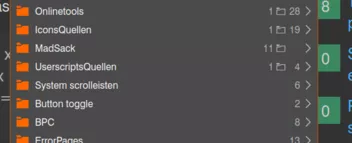
-
Ich habe deinen Vorschlag verworfen, so wichtig ist das nicht.
Komme gut mit meiner bisherigen Lsg. zurecht.
Dachte bloß: Bei soviel "action" in Bezug zu diesem Script könntet ihr was machen.
Aber leider ist dem nicht so!
GN8