


Alternativ für das Kontextmenü:
Ich verwende dies in meinem zweiten Browser, mit Korrekturen von Sören Hentzschel für einen flüssigen Bildlauf.
Alternativ für das Kontextmenü:
Ich verwende dies in meinem zweiten Browser, mit Korrekturen von Sören Hentzschel für einen flüssigen Bildlauf.
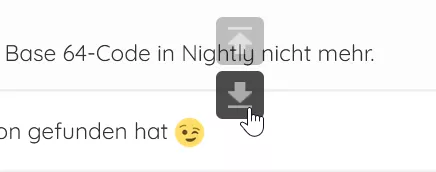
Das GreaseMonkey-Skript platziert seine beiden Schaltflächen auf der Seite, um die Seite so weit wie möglich nach oben und unten zu scrollen. Die X-Y-Position der Schaltflächen und die Transparenz sind anpassbar.
// ==UserScript==
// @name Scroll Up and Down
// @description Top and Down buttons
// @icon data:image/png;base64,iVBORw0KGgoAAAANSUhEUgAAABAAAAAQCAYAAAAf8/9hAAACFklEQVQ4jZWSzU8TQRjGn+5uv+nWspQiBEWjHvZAtOJJb5pY08TEsNGoHDh4kD+CbIx/hBfvaAzxaigePGAwEo2YgKmmHwH6ZYG2rt0tnXfGA0kjpK1xjjO/5zfPOxmgz4qZ4YmoqZ7rx7i67ppQTge1Z/rk+CMBgc31ref533tzeAJ2HJW7hgPawvXE5Mz4mSGEtSDCWiD+q9DUG1ed13gH3ltwePPCzeRFYyimgjgHI4LHpyA0GNCbBVtvXDsqkY+HbyXjRjSmwi38cMjpSNw+GQMRv+6UWkck8t/hRDJuDMdUDLrGEG2eRwk5MCLUa01IbgmyV0bwhFdn1XZnHBkALtyJvUzevmxEtAFo0hi+vN+2anbDQ2ELRIRcuozyTt1SowGP5JUQ1Pw67XG9sWS/kkZMderSlbNGIORFBKNYXy1YS59TCSEEGBEY5+BCYDtdTmS+lhzOOdx+GdGJkDFiqlOSgKtq7wt2Stax+anI3qyljKJprXQEROBCoGhaK8Xc/szO911GnKPVZEzAVXUBwPDT8A2fV552WrRYma8vA8Dc24fCGt0CI0Jmo4wPd390WLfbNd1ui8XKfH25+0cC8Dj1QNRO5sGIkP9Wwcd7ma6s0kvAhUCbscM34KIX1k/AcUAEIgIJ3gv7dwPiHNSngdTrIFvKrjqtA7TabVi79tp/N9jIpu/7fiqziiLBqdkvenF/AGL4Geu44wxZAAAAAElFTkSuQmCC
// ==/UserScript==
// [1] skip all iframe
if (window.self!=window.top) {
   return ;
}
// create element
function ce(n) { return document.createElement(n); } // end of function
// add style
function addStyle(css) {
   var head = document.head || document.getElementsByTagName('head')[0];
   if (head) {
       var style = ce("style");
       style.type = "text/css";
       style.appendChild(document.createTextNode(css));
       head.appendChild(style);
   } // end if
} // end of function
// global variables
var position,
   // figure out if this is moz || IE because they use documentElement
   el = (navigator.userAgent.indexOf('Firefox') != -1 || navigator.userAgent.indexOf('MSIE') != -1) ? document.documentElement : document.body,
   // timer
   t1, t2,
   // speed by
   speed_by_click = 200, // edit this value
   speed_by_over = 10,  // edit this value
   // z-index
   zIindex = 1001;       // edit this value
// move up
function move_up() {
   position = document.documentElement.scrollTop || document.body.scrollTop;
   window.scrollTo(0, position-0);
   t1 = setTimeout(move_up, speed_by_over);
} // end of function
// move downn
function move_dn() {
   position = document.documentElement.scrollTop || document.body.scrollTop;
   window.scrollTo(0, position+0);
   t2 = setTimeout(move_dn, speed_by_over);
} // end of function
// document height
function getDocumentHeight() {
   return (document.body.scrollHeight > document.body.offsetHeight)?document.body.scrollHeight:document.body.offsetHeight;
} // end of function
// document scroll
function get_scroll(a) {
   var d = document,
       b = d.body,
       e = d.documentElement,
       c = "client" + a,
       f = "scroll" + a;
   return /CSS/.test(d.compatMode)? (e[c]< e[f]) : (b[c]< b[f]);
} // end of function
// calk
function scrollTo(element, to, duration) {
   var //start = element.scrollTop,
       start = document.documentElement.scrollTop || document.body.scrollTop,
       change = to - start,
       currentTime = 0,
       increment = 20,
       newDuration = (typeof(duration) === 'undefined') ? 6000: duration;
   var animateScroll = function(){
       currentTime += increment;
       var val = Math.easeInOutQuad(currentTime, start, change, newDuration);
       //element.scrollTop = val;
       window.scrollTo(0, val);
       if(currentTime < newDuration) { setTimeout(animateScroll, increment); }
   };
   animateScroll();
} // end of function
//t = current time
//b = start value
//c = change in value
//d = duration
Math.easeInOutQuad = function (t, b, c, d) {
   t /= d/2;
   if (t < 1) return c/2*t*t + b;
   t--;
   return -c/2 * (t*(t-2) - 1) + b;
};
// add css
function shareCSS(){
   // variables
   var s='', img_up, img_dn;
   // img vs button
   img_up = 'data:img/png;base64,iVBORw0KGgoAAAANSUhEUgAAABIAAAAUCAYAAACAl21KAAAAAXNSR0IArs4c6QAAAARnQU1BAACxjwv8YQUAAAAJcEhZcwAADsMAAA7DAcdvqGQAAAB+SURBVDhPY1i1atV/amAGahgCMoNhaIGlS5cKAp19BoRBbLJcj2QILDJINwzoAmMgfoclIkBixkS5DI8hMJcRNgxoSBoOl6CnNZBhaVhdBjWE1MSJahjQkA4KEmYH2GUrV66cSYEhYB+AzKBtFiHkQqKiH6Ro1CDCQTWgYQQAs81DU0G/83sAAAAASUVORK5CYII=';
   img_dn = 'data:img/png;base64,iVBORw0KGgoAAAANSUhEUgAAABIAAAAUCAYAAACAl21KAAAAAXNSR0IArs4c6QAAAARnQU1BAACxjwv8YQUAAAAJcEhZcwAADsMAAA7DAcdvqGQAAACPSURBVDhPY2DAAlatWvUfH8amB6vYqEGEg2pgw4iQ7cTKM6xcuXImsYpxqQOZAQ4woIIOCgzrQAl1oEFpZBiWhitFgwx7R4SBIDXYDYGZDFRgTMAwkCHGhBMRJMxwGUa8ITCbli5dKgg08AySN8+AxIhyCboiJMPIN4Qsm6miiYioxltawvSDYogohYTUAQC80UNTOht/YwAAAABJRU5ErkJggg==';
   // button id
   s+='#play_btn_up { position:fixed; right:50%; bottom:34%;z-index:'+zIindex+'; height:36px; width:36px; cursor:pointer; background:url('+img_up+') no-repeat scroll 50% 50% rgba(0, 0, 0, 0.7); border-radius:5px 5px 5px 5px; margin-top:-24px; }';
   s+='#play_btn_dn { position:fixed; right:50%; top:70%;   z-index:'+zIindex+'; height:36px; width:36px; cursor:pointer; background:url('+img_dn+') no-repeat scroll 50% 50% rgba(0, 0, 0, 0.7); border-radius:5px 5px 5px 5px; margin-top:-24px; }';
   // button class
   s+='.play_btn { -webkit-transition-duration:0.5s linear; -o-transition-duration:0.5s linear; -moz-transition-duration:0.5s linear; transition-duration:0.5s linear; opacity:0.35; }';
   s+='.play_btn:hover { opacity:1; }';
   // append
   addStyle(''+s);
} // end of function
// main
function create_btn_element() {
   // get scroll
   var up, dn,
       scrolled,
       h = get_scroll('Height');
   // exit
   if(!h) { return; } // end if
   // add css
   shareCSS();
   // if
   if(el){
       // create DOM element
       up = ce('span');
       dn = ce('span');
       // set attribute
       up.setAttribute('id','play_btn_up');
       dn.setAttribute('id','play_btn_dn');
       // set class
       up.className = "play_btn";
       dn.className = "play_btn";
       // append element
       document.body.appendChild(up);
       document.body.appendChild(dn);
       // scroll
       scrolled = window.pageYOffset || document.documentElement.scrollTop;
       // if scroll
       up.style.display = (scrolled > 0)  ? "" : "none";
       // add event over
       up.addEventListener('mouseover', move_up, false);
       dn.addEventListener('mouseover', move_dn, false);
       // add event out
       up.addEventListener('mouseout', function(){clearTimeout(t1);},false);
       dn.addEventListener('mouseout', function(){clearTimeout(t2);},false);
       // add event click
       up.addEventListener('click', function(){ scrollTo(el, 0, speed_by_click); }, false);
       dn.addEventListener('click', function(){ scrollTo(el, getDocumentHeight(), speed_by_click); }, false);
       // add event scroll
       window.onscroll = function() {
           var scrolled = window.pageYOffset || document.documentElement.scrollTop, diffHeight = document.body.scrollHeight - window.innerHeight;
           // if scroll up
           up.style.display = (scrolled > 0)  ? "" : "none";
           // if scroll dn
           dn.style.display = (diffHeight > scrolled)  ? "" : "none";
       }; // end of function
   } // end if
} // end of function
// run it
create_btn_element();Teste bitte:
Wunderbar!  Ich danke Ihnen vielmals!
P.S.
In Ihrem Beitrag wird der Code zweimal wiederholt.
Hallo
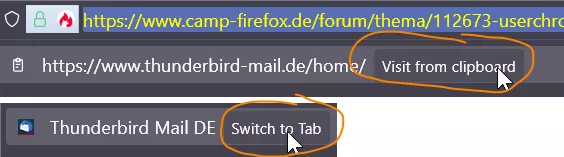
Firefox 125.0.1. Bitte helfen Sie mir, die Hintergrundfarbe und die Textfarbe der Button [Visit from clipboard] und der Button [Switch to tab] zu ändern. Die immersive Hintergrundbeleuchtung ist kaum wahrnehmbar.
Danke
// remove the frequently used option
pref("browser.taskbar.lists.frequent.enabled", false);
// remove the tasks list
pref("browser.taskbar.lists.tasks.enabled", false);
*CSS-Ordner*
Thank
Post 184 Dieses Skript. Wie kann ich den Chrome\CSS-Ordner zu den Ausnahmen hinzufügen?
Ideen und Vorschläge willkommen!
Ist es Ihr Ziel, Ihr eigenes vertikales Paneel zu entwerfen, oder wissen Sie nicht, dass es ein vertikal Toolbar von Aris-t2 gibt, das hervorragend funktioniert?
Mullvad hat einen guten Namen
Ja, aber es handelt sich um eine Windows-Anwendung, nicht um eine Browser-Erweiterung.
Ich habe keine Informationen gefunden, dass die Urban Free VPN-Erweiterung Daten sammelt.
"Hoxx VPN Proxy", "SetupVPN" (derselbe Entwickler, es gibt je nach Region alle 15-30 Minuten einen Timer für den erzwungenen Verbindungsabbruch. Der Timer kann leicht deaktiviert werden).
"WindScribe VPN", "Urban Free VPN".
"IP Geolocator" Erweiterung zeigt die Flagge des Landes, durch das Sie sich verbinden, es ist praktisch.
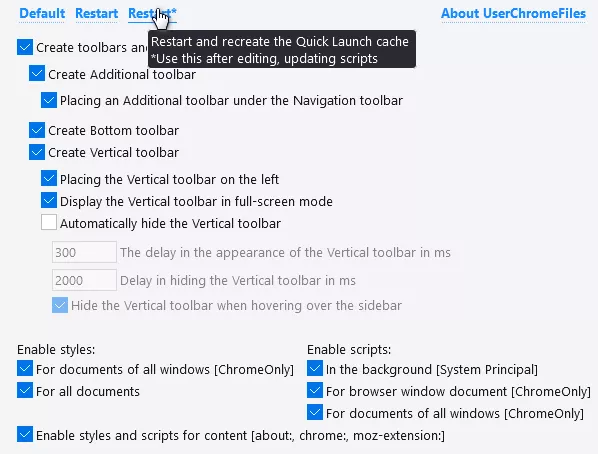
Skript-Loader im User_Chrome_Files (UCF) Konzept. Standardmäßig erstellt optional vertikale, obere und untere toolbar, Flexible Space, Space, Separator. Aufrufen der about:user-chrome-files
Benutzerskripte werden im Ordner custom_scripts abgelegt und in CustomStylesScripts.mjs aktiviert im Abschnitt
load: [ // By event "load"
Ein Skript für GreaseMonkey kopiert automatisch ausgewählten Text in die Zwischenablage. Ich muss das Skript so ändern, dass ein Rechtsklick den Text nicht erneut kopiert.
Vielen Dank für Ihre Hilfe.
// ==UserScript==
// @name        Selection-To-Clipboard
// @include        *
// @icon        data:image/png;base64,iVBORw0KGgoAAAANSUhEUgAAABgAAAAYCAYAAADgdz34AAAACXBIWXMAAAsSAAALEgHS3X78AAAA7UlEQVRIie2WvU4CQRSFv3NBVyLxJ3TbaGelHTwAjyCxoPTFaC1MeAVqKOnstLHUkGAMIHMpALPgLhFt55Z3zpzvZJozImccxHG9CaUu4iRPkxGPINzyMegJfPu4XHhRdoYjnMl6gzhcma53DhjSeaFNcbC7EtWXK4IqeBBYiukBgOBtCK/IHPNPxhdP4nG+F2AThjhtXPKlIQBlv2E0eM57ku2x3wD+MxEQAREQAREQAbCjk39U5lQppmWgKddU6jX/a2U6iGqjhVsHOPjWiWQlyJb+DPk94353v1+F8wYExFFOrCSjmzDz9yKbBUM1S8DTdPZUAAAAAElFTkSuQmCC
// selection-to-clipboard.js for Firefox + GreaseMonkey
// copy the selected text to clipboard
// ==/UserScript==
function copySelection() {
   let selectedText = window.getSelection().toString().trim();
   if (selectedText) {
       document.execCommand("Copy");
   }
}
/* Add copySelection() as a listener to mouseup events. */
document.addEventListener("mouseup", copySelection);Mein Endergebnis sieht jetzt damit * so ** aus.
Das ist sogar noch besser. Die Umlaute sind verzerrt, offenbar ein Fehler in Firefox selbst.

Teste mal das ↓.
Vielen Dank, das Ergebnis ist schön. Ich setzte die Länge auf 500px (by default 280px).
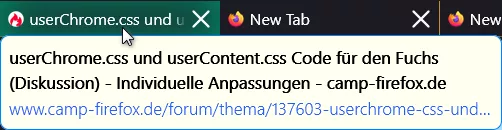
Brauche einen Stil für einen neuen Firefox v123.0 Tooltip. Einstellung der Hintergrundfarbe, des Tab-Namen-Textes, des Adress-Textes.
Danke.
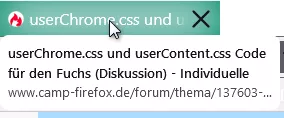
browser.tabs.cardPreview.enabled = true
browser.tabs.cardPreview.showThumbnails = true (with preview), = false (without preview)
Ich nutze allerdings eine andere Farbe...
Wenn Sie dem ersten Abschnitt des Codes zwei Zeilen hinzufügen, fügt sich der progress-bar harmonischer in Ihr Konzept ein.
Visuelle Anzeige des Seitenladezustands in der Kopfzeile der Tab, ich finde das nützlich.
/* userChrome.css */
/* progress-bar page loading in the tab header */
.tabbrowser-tab:not([usercontextid]) > .tab-stack > .tab-background > .tab-context-line {
    opacity: 0;
    background-color: #ff8080;
    height: 6px;
}
.tabbrowser-tab:is([busy], [progress]) > .tab-stack > .tab-background > .tab-context-line {
    opacity: 1;
    transform-origin: left center;
    animation: 2s ease-in-out scale;
}
.tabbrowser-tab[bursting] > .tab-stack > .tab-background > .tab-context-line {
    transition: opacity 2s ease-out;
}
@keyframes scale {
    0% {transform: scaleX(0);}
    100% {transform: scaleX(1);}
}
In diesem Thema können Sie Ihre Codes für userChrome.css und userContent.css austauschen oder diskutieren, wie sie funktionieren, ohne separate Themen zu erstellen. Das Beispiel stammt aus dem Thema userChrome.js Scripte für den Fuchs (Diskussion)
Herzlich willkommen 
Bringen Sie das Stern in die Adressleiste zurück. Ich weiß nicht, ob das jetzt funktioniert.
Accidentally removed the bookmark star button from address bar- how do I get it back? | Firefox Support Forum | Mozilla Support
Auch die Hotkeys Strg+D zeigen den Dialog zum Speichern/Löschen eines Lesezeichens.